
Frequently Asked Questions
What file formats do you require? How do I set up my files correctly?
We need a 1-up, press-ready PDF file with crop marks and bleed. Please see the "Preparing PDF Files" section of this web page for information about creating press-ready PDFs.
What are crop marks?
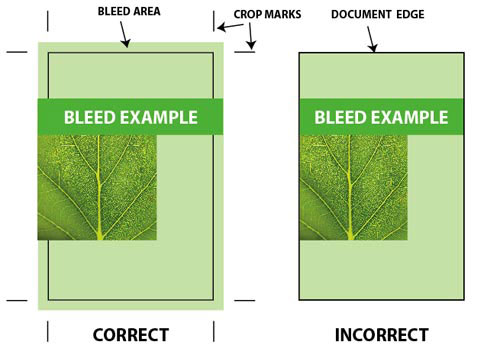
Crop marks are printed or drawn lines indicating where the paper should be cut to produce the correct page size.
Do I have to draw crop marks manually?
No. Any desktop publishing software can create crop marks automatically when you export your file into a PDF. In this case, you have to make sure that the trim size is the same as your document size. For example, if the final trimmed size of your business card is 3.5" x 2" then your document size must be the same.
Do I have to impose my artwork myself?
No. All files are imposed automatically by our workflow. If you submit the imposed file yourself, chances are that we will have to break it apart and re-impose it.
What is bleed?
If any element on your document layout makes contact with the document border you will have to use bleed. The trick is to place the element so that it goes over the border where the document will be cropped after printing.
The term bleed is used for all objects overlapping the border of your document.
Should I convert my files into CMYK?
No. Conversion from RGB to CMYK is done automatically on our workflow.
What resolution should I use for the images in my artwork?
We recommend that all images be saved at 300 dpi.
We help small businesses and marketing teams stand out with high-quality digital printing, graphic design, promotional products, Every Door Direct Mail (EDDM), trade show materials, and custom apparel & embroidery. From logo design and business cards to postcards, brochures, mailings, and full-color t-shirt printing, we provide end-to-end print and brand solutions that deliver results. Whether you need branded apparel, targeted direct mail campaigns, or professional print materials, Blue Dog can bring your vision to life.